
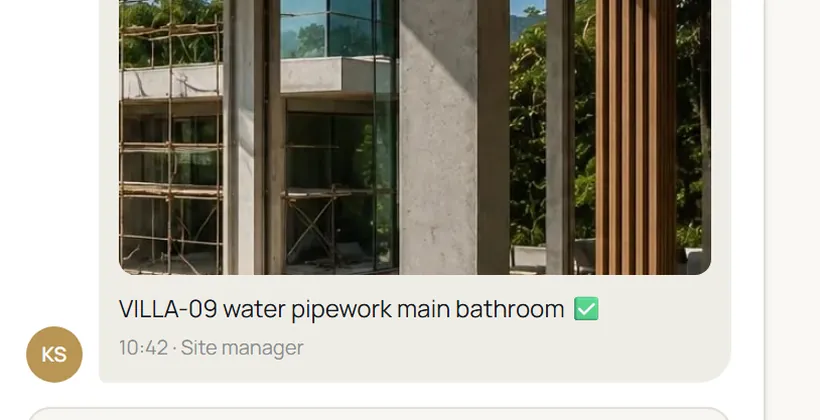
Send it to TEKTON.
A photo and a property reference go to your project’s TEKTON channel on LINE or WhatsApp. Same phone, same routine, one destination.
 TEKTON
Book a walkthrough
TEKTON
Book a walkthrough
Your site team keeps sending photos on WhatsApp or LINE.
Each one reaches the right buyer’s private portal. You keep the final say.
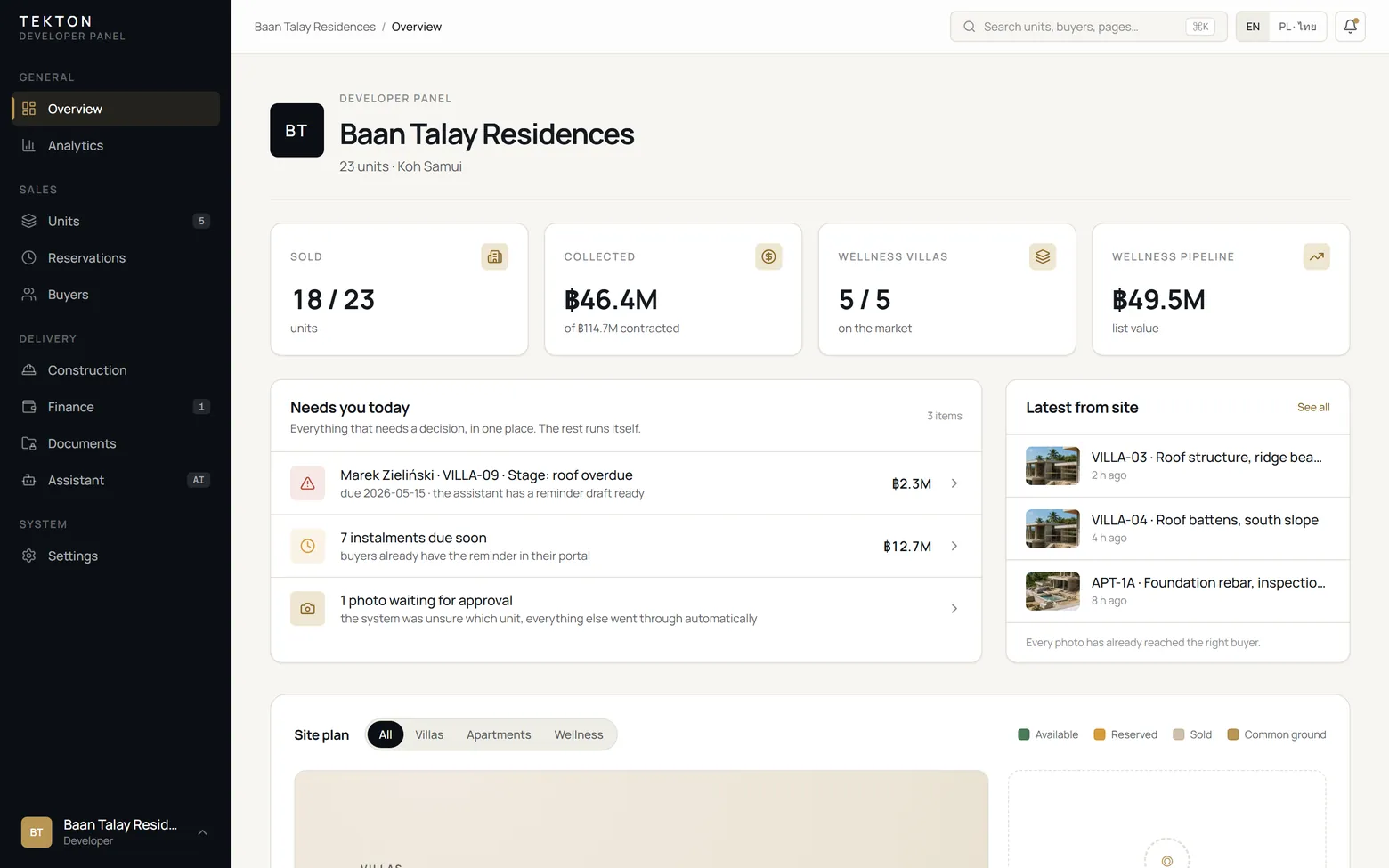
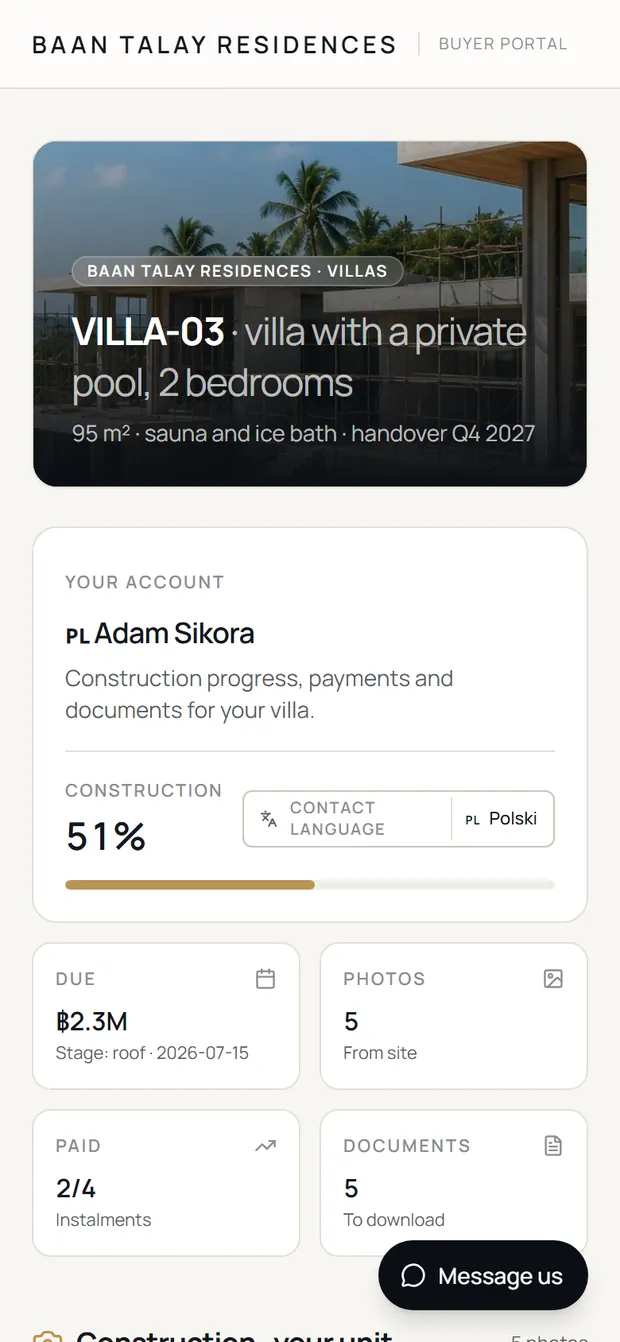
An off-plan sale starts a relationship that runs for the whole build. Your buyers keep a persistent view of their property. Your team keeps one place for updates, payment schedules and the decisions that need attention.
See the communication flowCalls, chats and spreadsheets each hold a piece of the picture.
TEKTON captures the update once, organises the context and keeps the buyer informed.
A photo and a property reference go to your project’s TEKTON channel on LINE or WhatsApp. Same phone, same routine, one destination.
Update matchedTEKTON reads the reference, attaches the update to the right property and holds anything uncertain for your team.
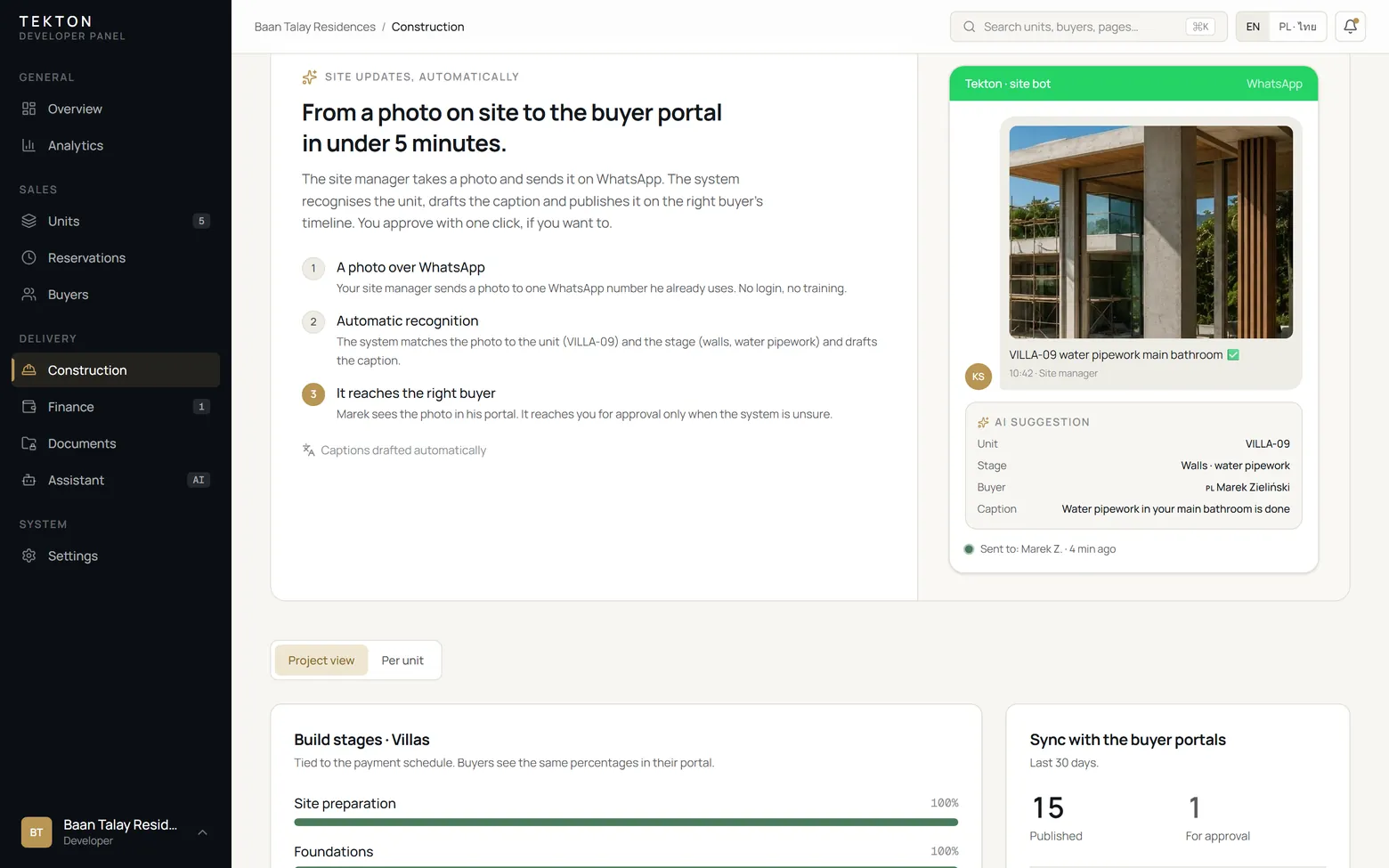
Progress, payment milestones and documents sit on one property record. Nothing depends on who remembers the conversation.
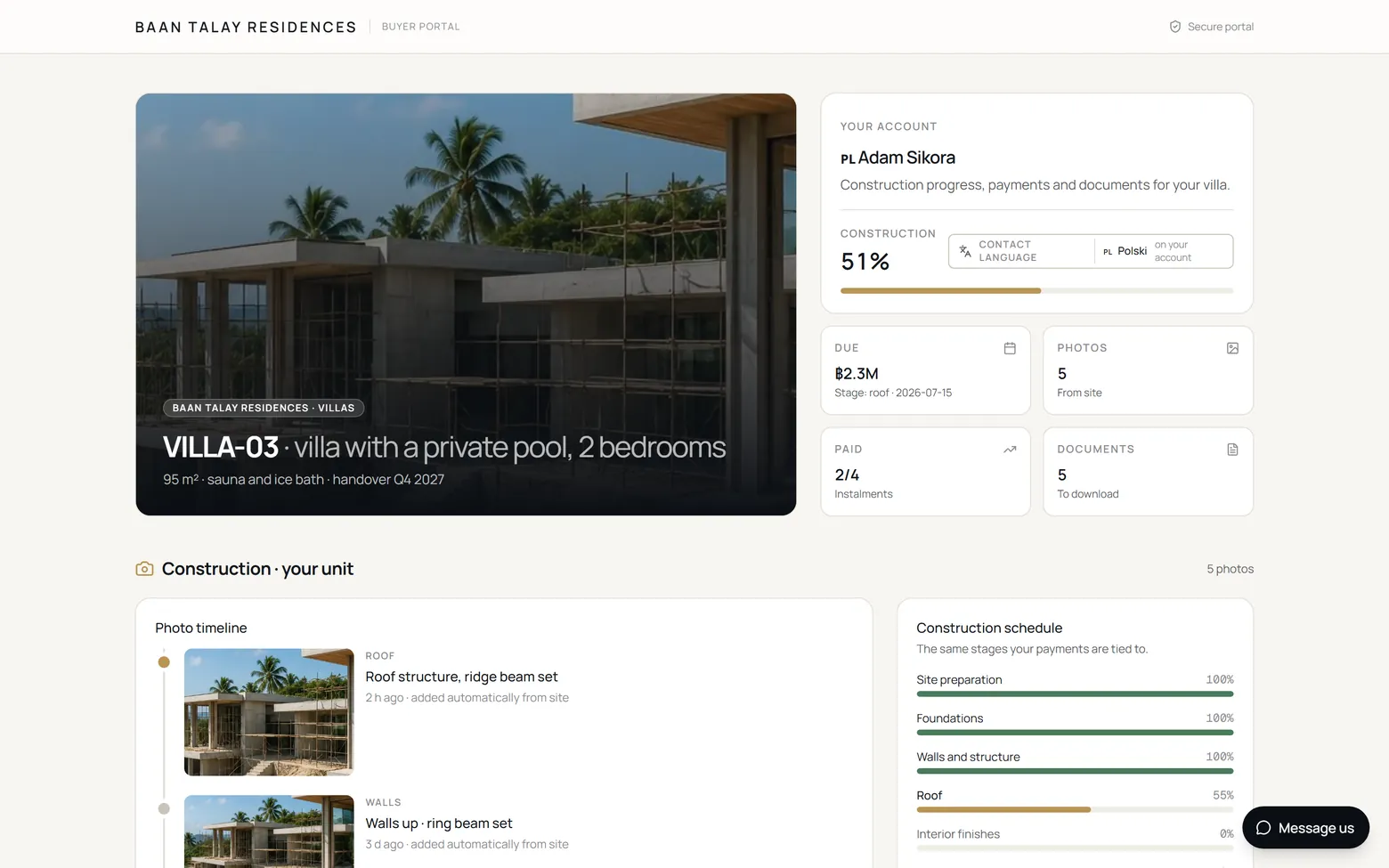
The buyer opens their private portal whenever they want. The latest update, the schedule and the documents are already there.
Live with a first off-plan development on Koh Samui · Your project’s name on every buyer screen · No new app for the site team
No savings calculator. The gains are operational: fewer repeated questions, clearer follow-up, persistent buyer access and one source of context.
An off-plan buyer might be a flight away from the site. Their private portal holds the latest photos and progress beside their payment schedule and documents, so the basics never need a phone call.
THE DEVELOPER’S VIEW · SAMPLE PROJECT“Don’t show me everything. Show me what needs my attention.” The overview opens on the exceptions: overdue instalments, buyers waiting for follow-up, updates waiting for review.
Not a list of features. One connected line: every update, stage, milestone and next action belongs to a property and stays visible to the people who need it.
Every update lands on its property, with the context around it.
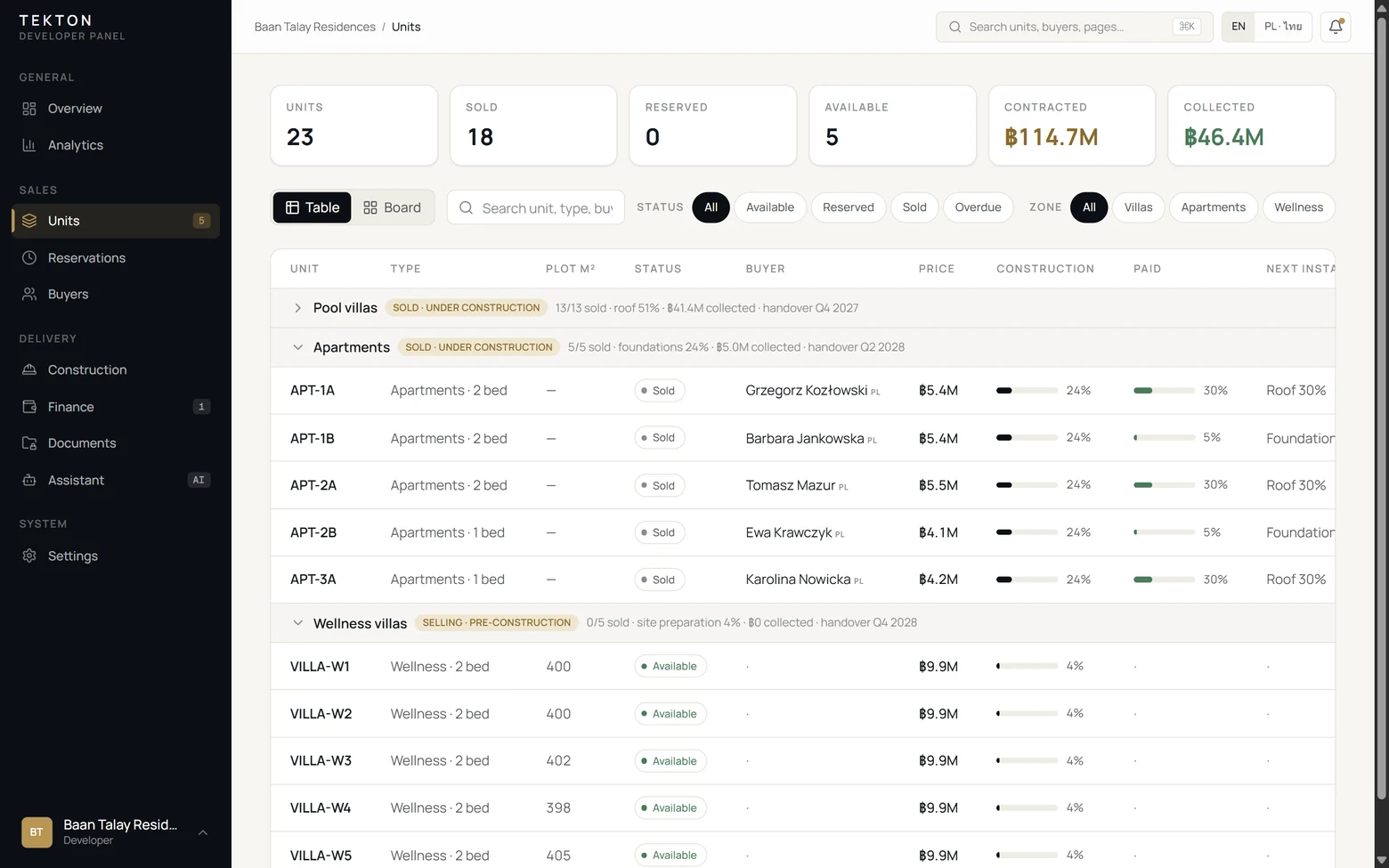
What has been collected, what is due next and where the build stands, per unit and across the project.
Exceptions surface in the brief. The decision, and the record of it, stay with your team.
TEKTON prepares, organises and reminds. Decisions that carry responsibility stay with your team, and every decision is recorded on the property.
TEKTON runs with a first villa development on the island: buyer portals in the project’s name and a payment schedule per unit, with the site channel joining as construction starts. The team that uses it daily shapes what gets built next.
Buyer communication, project updates, payment visibility, follow-up, approvals and daily priorities in one workflow.
Screens on this page come from a sample project. The pilot’s own data stays private to its developer.
Open the demo as the developer, then as a buyer. It runs on a sample development, so names and figures are illustrative. The workflow is the real one.
Every unit is its own record: zone, plot, buyer, construction stage and payment schedule. A second development is a separate project under the same account, and nothing crosses between them.
The whole configuration is on our side. On yours: a complete set of materials at the start and one short session for the team. One language per project, chosen at setup.
The clock starts when the materials are complete. If something is missing, we launch on what exists and add the rest later.
No per-user seats and no per-buyer charges. You pay once to set the project up and a flat monthly fee while it is being built.
Half on order, half after the test period.
For the construction period. Cancellable month to month.
Prices exclude VAT. Document Vault, for portals that carry identity documents, contracts or payment confirmations, is an optional configuration priced per project. Several developments? Each is its own project under one account; ask for a portfolio price.
So the first question is what goes in at all. The portal holds only what has a job there. The rest stays with you.
Units with size, price and status. Buyers by name and country. Payment milestones as amounts and dates, never bank details. Site photos with captions. Accounts as an email address and a password hash.
A buyer account is bound to one buyer record at sign-in, and every page uses that binding, never the address in the browser. Files sit in private storage and open only through the signed-in session. Any account is switched off in one click. Keys and database credentials stay out of the code.
If a break-in is detected, you are told within 24 hours. Affected accounts are locked and every password is reset. The database is yours: your office downloads a full export from the panel at any time, and if you stop the service our copy is deleted on an agreed schedule.
Application on Vercel, database on Neon and file storage on Vercel Blob, all on infrastructure outside Thailand. Every project logs each sign-in and every file opened, and pauses sign-in for 15 minutes after five failed attempts. Document Vault, an optional configuration for portals that carry identity documents, contracts or payment confirmations, adds two-factor sign-in for office accounts, expiring links, encrypted daily backups and a written deletion schedule. The full security write-up is available at the walkthrough.
BEFORE YOU DECIDE
A group works with five buyers. With twenty, every photo is seen by everyone, every payment question is read by the whole room, and your office answers the same thing again and again. The portal gives each buyer their own page and leaves the group for what it is good at.
Neither. Tekton is the communication layer between you and the people who have already bought: their property, the stage, their schedule, their documents and the photos from the site. Sales pipelines, contractor schedules and defect lists stay in the tools you use for them.
That is what the split is for. Half the set-up fee on order, the first project built on your real units, schedules and buyers, then seven to fourteen days of real use by your office. The second half follows the test. We do not build it in full for free first; the demo exists so you do not have to take it on trust.
Each buyer receives a personal login to a portal in your project’s name. Nothing to install: a link and a login, on any phone. They see only their own property: photos, progress, payment schedule and documents. Nothing from other buyers, nothing from project finances.
No. You send the materials, we build the project, and the go-live session for your office runs on a video call. The site channel is a LINE or WhatsApp group your team already knows how to use.
DATA AND SECURITY
The application runs on Vercel and the database on Neon, on infrastructure outside Thailand. The data is yours: your office downloads a full export from the panel at any time, and each buyer can download their own. If you stop the service, our copy is deleted on an agreed schedule.
Bank and card details, never: payments are milestones, amounts and dates. Passport scans can stay in your office, with the portal recording only that the check was done, when and by whom. Contracts and payment confirmations in the portal run on the Document Vault configuration.
No system is compliant on its own; an organisation is. The portal gives you the technical half: access separated per buyer, a log of every sign-in and every file opened, a deletion schedule on the Document Vault configuration, and a written data agreement with us. The other half is paperwork on your side: a privacy notice for your buyers and someone named as responsible. We tell you exactly what the system does; we do not certify your company.
No. Buyers see your project’s name, not ours, and support runs through your office. We never message your buyers and never pass their details to anyone, including the next developer who asks for a reference.
Yes. Uncertain updates are held for review and publication can require your approval. Buyers see progress, schedule and documents for their property, never the project’s finances.
Everyone in your office who needs one, each with their own login and at no extra charge. Buyers get their own. Nobody shares a password, and any account is switched off in one click.
You take the full export: units, payments, documents and site photos in standard formats, and run without us. Our copy is deleted on the agreed schedule. The code stays ours under licence; the data was always yours, and that is the part that would hurt you to lose.
RUNNING IT DAY TO DAY
Very little. The site team keeps sending photos from the phone it already uses, now to the project’s TEKTON channel. Your office reviews what the system is unsure about and decides when invoices and reminders go out.
The portal shows the real state and invents nothing. Your office posts the reason once, on the units it concerns, and every buyer reads it on their own page instead of calling. A quiet timeline is your early signal, before the buyers notice.
Overdue instalments, updates waiting for review and reminders gather in one brief. Your team sees what needs attention and acts from there. Invoices and reminders always go out on a decision from your team.
Instalments follow the schedule agreed with each buyer. Collected, due soon and overdue are visible per unit and across the project. The buyer sees their own status and history.
Every unit is its own record with zone, buyer, construction stage and schedule. A second development is a separate project under the same account, and nothing crosses between them.
One language per project for the buyer portal, chosen at setup: English or Polish today, other languages on request. Your site manager keeps writing on LINE or WhatsApp in Thai or English; we agree a short list of stage words with him, and when a label is unclear the bot asks instead of guessing.
The monthly fee runs for the construction period and stops month to month whenever you say. Buyers keep their access until handover; after that you decide whether the portal stays on for documents, and you can take a full export either way.
Walk through your properties, buyer communication, payment milestones and daily workflow.
Walk through your project Explore the developer demoBuyer data stays inside your project, walled off from every other developer. How it is protected is set out in the security section above and in full at the walkthrough.